Showing posts with label alphasmart neo. Show all posts

Tuesday, May 18, 2010

Alphasmart Neo As An iPad Keyboard

I’ve blogged about the AlphaSmart Neo before and have been eyeing the iPad ever since I heard about it.  Eolake Stobblehouse figured out that the iPad’s camera connection kit allows you to use both of them together.  What’s particularly nice with this pairing is that the Neo allows you to send any text document that you’ve created on it simply by hitting the ‘Send’ button.  The receiving device thinks it is connected to a normal keyboard with someone typing out the characters.

For general use, I doubt I’d prefer this set-up to using a wireless keyboard, but it’s nice to know if/when I finally get an iPad, it might help breathe some new life into my Neo.  With 700 hours of battery life, the Neo is great for travel.  The LCD screen also makes it ideal for outdoor use.

(HT Gadget Labs)

Thursday, September 03, 2009

Multitasking Works? Not Really, According to Stanford Study


Multitaskers think they get more done, but according to this research, it just ain't so:

Attention, multitaskers (if you can pay attention, that is): Your brain may be in trouble.

People who are regularly bombarded with several streams of electronic information do not pay attention, control their memory or switch from one job to another as well as those who prefer to complete one task at a time, a group of Stanford researchers has found...

...after putting about 100 students through a series of three tests, the researchers realized those heavy media multitaskers are paying a big mental price.

"They're suckers for irrelevancy," said communication Professor Clifford Nass, one of the researchers whose findings are published in the Aug. 24 edition of the Proceedings of the National Academy of Sciences. "Everything distracts them."

I know a few law students who do not bring laptops to class for this very reason. In my own experience, one of the highest grades I got in law school was in a summer class I took where I only used my Alphasmart Neo for taking notes instead of bringing my laptop to class. It forced me to focus on the topic at hand by eliminating potential potential distractions. Worked like a charm!

Thursday, July 31, 2008

The Five Best Note-Taking Tools


Lifehacker has the roundup. Here's what their readers listed as the best note-taking tools (in no particular order):
  1. Evernote (Windows/Mac, Free)
  2. Pen(cil) and Paper
  3. Microsoft OneNote (Windows, Shareware)
  4. Google Notebook (Web-based, Free)
  5. Personal Wiki
I've used all of these at some point or another, with the least experience with Google Notebook. All of them are good -- I particularly like OneNote and Evernote.

Another one of my favorite note-taking tools is my AlphaSmart Neo. It has one of the best keyboards I've ever used, lets me beam notes to my Treo or synch them up to my laptop, is instant-on, and probably gets over 1-year of battery life off of 3 AA batteries. (I've had mine for 3-1/2 months now and it still has 92% battery level after significant use.)

Moleskines are by far my favorite notebook. For those who use Evernote or OneNote, Evernote just released a OneNote import function. I look forward to testing this out soon. (The beauty of Evernote is that it synchronizes across multiple computers and stores all of your notes online as well.)

Eugene Volokh has a post with excellent recommendations from his readers on how to take notes for research.

On My Way To Chicago

I just boarded a plane on my way to Chicago for a job fair. (I'm interviewing for an internship for next summer. Things start very early in law school.) I'm typing this post up on my Neo and will beam it over to my Treo to upload to the blog.

While in the airport, I tried starting up my laptop (Vista) to see if I could get a Wi-Fi connection and it locked up. Pulled out my AlphaSmart Neo, pushed the on button, and it started immediately. I continue to love this thing!

I've had my Neo since April, using it heavily off-and-on and just confirmed it still has 92% battery level. (It runs for months on 3 AA's.) I used it to take notes for my class this summer and the lack of Internet helped keep me undistracted during class. My notes were the most comprehensive of any of my law classes and I got one of my best grades yet in law school.

Due to travel, blogging may be a bit light for the next few days, but I will post when I can. I have the next week off after the interview tomorrow and am looking forward to some nice R&R.

Thursday, April 24, 2008

Studying With My Neo

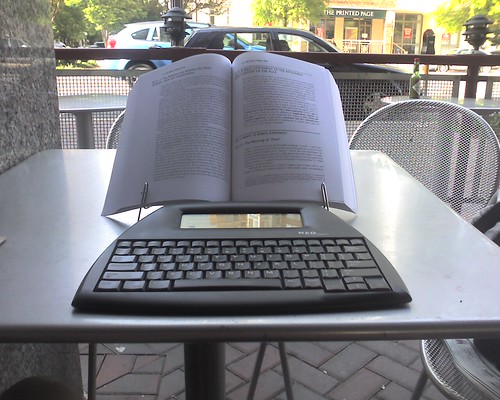
neo_study

I decided to study Contracts outside for a few hours today. I discovered my Neo works great for taking notes from a book propped up with a bookstand. Not only that, but the Neo's display is much easier to read outside than my laptop's.

When I was done taking notes, I beamed them over to my Treo and then e-mailed them to myself -- giving me back-ups of my notes on my Treo, online in my GMail account, and on my PC. How cool is that?

P.S.
-- I got my Neo two weeks ago today. I've used it extensively during this time and the battery level is still at 95%!

P.P.S. -- I took this photo with the camera on my Treo. See 10 cameraphone photos that rock and 12 tips for taking bettter pictures with your cameraphone.

Friday, April 11, 2008

My Very Own AlphaSmart Neo


I just received an AlphaSmart Neo today that I ordered on Monday. I've been thinking about getting this for a while now and decided to finally take the plunge. Below are some of my initial impressions of the device. I plan on putting this through the paces over the next few days (weeks?) and will share additional thoughts as I go along.

I really like this device a lot! It is superb! The Neo is simple and does one thing only, which is the beauty of it. The keys are slightly noisy with a "clackity" sound, but I actually find that this helps me type faster -- giving me both audible and tactile feedback (and visual if I'm looking at the screen) that I'm typing what I mean to type. The keyboard is at least as good a keyboard as my ThinkPad! (How cool is that?) It truly does make me want to just write.

I also found out that this works superbly as an external keyboard. If I use my laptop for too long at my desk, sometimes my back gets a little sore. I was able to put my laptop onto my bookstand to elevate it, use my cordless mouse, and hook the Neo up to it using the USB cable. It gets my laptop's monitor up to eye-level and makes the ergonomics of it much more similar to using a desktop PC.

I was also pleasantly surprised to discover the Neo supports direct IR beaming to my Treo. What this means is that I can type up documents, e-mails, and blog posts on the Neo and beam it over to send with my smartphone. It works like a champ and is something I wasn't expecting. (I knew I could beam things over, but thought I'd have to get a memory card and third-party software for the Treo to make it work.) This enhances the functionality of both the Neo and the Treo. (I just realized they rhyme!)

I can't tell you how much I appreciate having something with a great keyboard that is noiseless, heatless, and lightweight to type on that I essentially never have to worry about it running out of power. (Many owners get more than a year of constant use out of their Neos before having to change batteries.)

I can't find it in the documentation, but it looks like the Neo gets powered by USB when using it as an external keyboard -- another unexpected feature that is pleasantly surprising.

The Neo appears to be a fantastic device for writing, taking notes, and jotting down ideas. It can act as an extension to both my computer and my smartphone in ways I wasn't anticipating. The best part about it is that it is so simple, it just works -- no operating systems to fool around with, no software to install, virtually no learning curve whatsoever. Basically, I just installed the 3 AA batteries that came with it and it was immediately ready to go. Less than a minute out of the box and I was up and running.

I plan on putting my Neo through the paces over the next few days and see how well it performs. So far, I would say it exceeds expectations and I am very, very impressed.

(This blog post was written on my Neo and beamed over and uploaded with my Treo. I will add a few photos and hyperlinks after I upload it.)

P.S. -- See all of my posts on the AlphaSmart Neo here.

Saturday, April 05, 2008

Distracted No More


(Photo via StarbuckGuy)

Here is a three-minute audio clip about the advantages of simple computing. In it, commentator Paul Ford describes the dilemma I face every time I turn on the computer -- endless distractions. He offers a few solutions for dealing with them, giving high praise to the AlphaSmart Neo.

Here is more praise for the Neo:
“I've used AlphaSmart products, including Neo, on assignments all over the world—from the Inca Trail in Peru to sacred Mount Kailash in Tibet,” says Jeff Greenwald, author of the award-winning travel books Shopping for Buddhas and The Size of the World, and Contributing Editor for Travel + Life. “It's the perfect notepad: lightweight, comfortable, and tough. The fact that it runs—seemingly forever—on AA batteries allows me to take it on treks and expeditions where there's no electricity, for weeks at a time. And it's so portable that I enjoy using it in cafés, on park benches, even on trains and buses.”
And more here:
The three killer features of the Neo are its simplicity, its portability, and its near-absolute independence from a power source. It completely untethers the writer from the desk, and unlike a laptop, it doesn’t require you to take up station near an outlet. It’s so sturdy and lightweight that you can take it everywhere, and its instant-on system means that you have to waste no time waiting for your writing rig to boot or wake up from sleep. It remembers your last active file and the position of the cursor, so you just turn it on and start typing. It’s also completely silent, and emits no heat at all.
And even more:
With an Alphasmart I can write in almost any situation that suites my fancy. I just pull it out of its bag, turn it on, write away, and then put it back. Alphasmarts turn on and off instantly, and I do not even have to bother saving what I type, as the device does this automatically. Alphasmarts are far quicker to use than a laptop, and with three AAA batteries they are powered up for 700 hours. They also do not require electricity. In point, the Alphasmart allows me to write... in many situations that I could not with a laptop. Just having the ability to take out the Alphasmart and write whenever I please has increased my productivity greatly... in those little lee moments in travel when I have a few minutes of downtime- like just before going to bed, or while sitting around a hostel waiting to leave, or in the interim between doing things- the Alphasmart has been invaluable.
The Neo continues to sound like a fantastic device to me. I have yet to read a negative review of it and am very close to pulling the trigger and ordering one.

Friday, March 28, 2008

A Two Laptop Minimum?


Mike Elgan thinks that two laptops are now the minimum required:
Ten years ago, every frequent-flying, executive-platinum mobile professional required a desktop PC back at the office and a laptop for the road. "Ultra-portables" or extreme mini computers were an expensive and optional luxury for serious enthusiasts or big shots with expense accounts. But in the last year, all that has changed.

Three things have happened that have turned around this formula for mobile success:

1. Regular laptops have gotten far cheaper. Moore and his law have brought down the costs of miniaturization, LCD real estate and other components.

2. Researchers have established an inescapable correlation between screen size and productivity. (Read this and this.)

3. The Asus Eee PC and its ilk have transformed the market -- and pricing -- for tiny laptops.

This combination of factors has transformed the magic "sweet spot" for what's required and what's optional. The new formula is that an "ultra portable" or tiny laptop is now required, a laptop with the biggest possible screen (within reason) is required, and a desktop PC is now optional.

James Kendrick thinks it takes three:

For the most part I agree with Mike although in my case it's currently a 3 laptop minimum. I don't even own a desktop PC like Mike thinks you need at home, no I'm quite happy with my 17" MacBook Pro with a second monitor attached on my desktop. Throw in the HP 2710p and the Fujitsu P1620 and my 3 laptops are hard to beat. I would disagree with Mike on needing a bigger laptop for working in hotels on trips however. I find the P1620 to be a full-function laptop with no compromises for getting things done but that's likely just me.

Here's an excerpt from the post about screen size and productivity:

Researchers at the University of Utah tested how quickly people performed tasks like editing a document and copying numbers between spreadsheets while using different computer configurations: one with an 18-inch monitor, one with a 24-inch monitor and with two 20-inch monitors. Their finding: People using the 24-inch screen completed the tasks 52% faster than people who used the 18-inch monitor; people who used the two 20-inch monitors were 44% faster than those with the 18-inch ones. There is an upper limit, however: Productivity dropped off again when people used a 26-inch screen.

I'd be curious to see follow-up studies to investigate if it's actually the screen size or pixel resolution is the true source of increased productivity? I'd guess both have an impact, but would expect screen resolution to have a greater impact than screen size. (Excepting micro-sized screens.)

Another advantage of traveling with two laptops would be using software like Synergy or MaxiVista to create a mobile, multiple monitor set-up.

On the other hand, couldn't you get a lot of the productivity gains simply by traveling with a laptop and an AlphaSmart Neo? I still love the idea of a nearly indestructible writing machine with 700 hours of battery life.

Monday, March 03, 2008

The Ultimate Writing Machine?


Following up on last week's post on the AlphaSmart Neo, here is a four part review of the device I came across by Marc Zeedar on Macopinion:


Marc also compares his Neo to the new MacBook Air.

The things that really intrigue me about the Neo include the 700 hours of battery life, light weight, ruggedness, instant on, and lack of distraction. I love the thought of being able to take it anywhere without worrying about power. It's cheap enough ($219) compared to computer that it wouldn't be the end of the world if it ever got damaged or stolen, making me far more likely to take it places I would never take a laptop.

The things I don't like about the Neo include extremely low memory (512k), no SD card slot, and no backlight. Even so, I would love to get my hands on one of these. It would be perfect for taking notes in class precisely for the same reason it would be tough to use stop using my laptop -- lack of distractions.

Thursday, February 28, 2008

Q10: The Minimalist Word Processor


After writing my post on how the simplicity of the AlphaSmart Neo makes it a great tool for writing, I came across Q10, a full-screen, simplistic text editor that is great at what it does. Q10 fills up your whole screen, keeping your focus on the writing you are doing. It is a no-frills text editor that hides everything else you have on your computer (including your taskbar), helping you to concentrate on the words you are writing. It hearkens back to the early days of DOS on the original IBM PC. The best part about Q10 is that it is a small file that you can run off of a USB drive. Highly recommended!

If Q10 doesn't strike your fancy, here is a round-up of 10 other minimalistic word processors.

Saturday, February 23, 2008

AlphaSmart Neo: Sophisticated Simplicity


Unclutterer has a good post about the benefits of using tools to write with undistracted simplicity:
Two ideas recently converged for me in one device. The first idea is the notion of self-imposed limitations, and the second is the concept of retro-computing. The device is the AlphaSmart Neo. Here’s how it all fits together.

I discovered the AlphaSmart Neo, in part thanks to Paul Ford’s writings. What is the Neo? It’s a full keyboard with six-line LCD attached. That’s it. No distractions. It’s a thing of beauty.


At two pounds, I take it everywhere. Instant-on, and automatic save of every keystroke make it even more appealing. Some other retro advantages:

  • At an all-day conference my three-hour battery on my Mac isn’t much help and I have to be on the hunt for limited power outlets. (The NEC MobilePro wouldn’t fare much better.) The Neo’s frugal processor and simple screen, on the other hand, gets me 700 hours from 3 AA batteries. That’s about a year’s worth of normal use.
  • The keyboard is amazing. It’s a real, honest-to-goodness keyboard with satisfying travel and quiet clickitiness. It really feels better than my Apple Bluetooth Keyboard, which is the same design as the Air’s. It also beats out the MobilePro’s slightly cramped keyboard.
  • AlphaSmart was started by two former Apple engineers and it has overtones of the eMate 300. Like the eMate, the AlphaSmart was designed for the education market, and it shows in the build quality. If it’s tough enough for kindergardeners, it’s tough enough for me.

Most important, though, is that it keeps me focused. If I go to a coffee shop to get some work done, the only thing I can do with my Neo is write. There are no distractions. There isn’t even bold or italics (something I get around with Markdown). When writing is the only thing you can do, you get it done, and it remains an enjoyable activity because it’s not the thing that’s keeping you from Twitter.

At some point in our technological past we perfected word processing. Every feature since then seems to have subtracted from the experience. Do yourself a favor and look into some single-purpose, “underpowered,” and self-limiting tech.

I've read many reviews of the Neo in the past and all of them have been glowingly positive. I've even had a post on it before.

Some very clear benefits I see to using the Neo in lieu of a laptop:
  • Lack of distraction. I will be the first to admit to having weak willpower in a wi-fi equipped classroom when a professor's lecture gets a little dry. Taking notes on the Neo instead of a laptop would help remove the temptation to e-mail and web surf.
  • Truly untethered computing. With 700 hour battery life from 3 AA batteries, this thing can go for about a year before needing to swap out batteries. No more needing to hunt for a spot against near an outlet at the coffee shop. (The battery life is more like that of a calculator than a laptop.)
  • Instant On. This would allow the Neo to serve more closely as an electronic notebook. As soon as inspiration hits, turn it on and immediately start typing. This also would allow you to turn it on, type in a quick idea, and turn it off again.
  • It saves as you type. No need to constantly save whatever file you're working on. As you type, it saves whatever you input. It's like OneNote in this regard.
  • Infrared. If I understand correctly, you can beam files directly from the Neo to a smartphone and e-mail them out from there. (One journalist now uses the Neo and a Nokia 95 for his traveling toolkit.)
  • Cool running. Unlike my laptop, the Alphasmart Neo doesn't put out any heat. It would be comfortable to use in your lap for hours at a time.
  • Ruggedness. This device can supposedly take quite a beating and still work brilliantly. (It was designed to be used by elementary school kids.)
  • Lightweight. It weighs about 2 pounds and doesn't need any kind of power adapter since it has such great battery life. Carrying it around would be much less burdensome than carrying most laptops.
  • Outdoor use. The combination of super-long battery life and ruggedness would make this perfect for taking to a quiet spot outdoors to do some writing -- something I would be reluctant to do with a laptop.
  • Travel. This would make a great travel journal. I've tried numerous things for recording my thoughts on my journeys around the world. Notebooks certainly work well, but I can type so much more quickly than I can write. The Neo is cheap enough, I wouldn't worry as much about it getting stolen as I would a laptop, the ruggedness of it, and its light weight would make it easy to carry around and (unlike a laptop) I wouldn't hesitate to use it almost anywhere. I can think of many trips when having something like this would have been ideal for jotting down thoughts and reflections -- lounging in a hammock while going down the Amazon River, riding trains in Europe, sitting on a deck chair on a cruise ship in Alaska, traveling across the US by car, etc. The fact that it's essentially windproof is a big advantage to using it outdoors as well. Obviously, I wouldn't use it in the rain, but I wouldn't do that with paper either. The ability to hook it up to any computer via USB and have it automatically type things into the computer would make this perfect for using at Internet cafes. (Type up your e-mail ahead of time, connect it to the PC, open up GMail, push a button, and watch it automatically type your text into whatever program you have open on the PC. If I understand it correctly, you can also use the Neo as an external keyboard for your computer.)
  • It's flat. The fact that this is flat instead of a clam-shell like most laptops is also an advantage. It makes this much easier to use in a wide variety of situations and makes it less of a barrier between you and other people during meetings and social gatherings. I can think of several seminars and debates I've attended in DC where this would have been ideal for taking notes on, but would hesitated to use my laptop because of boot-up time and unwieldiness. This would also make it great for using on an airplane tray table without having to worry about the person in front of you cracking your laptop screen when they lean their seat back. I could also see myself using this on the subway riding into DC or sitting on the steps at the Lincoln Memorial.
Like other reviewers, I wish the Neo had an SD card slot for file storage and transfer, and a backlight for the display, but otherwise it seems like a near perfect tool for writing.

While the Neo certainly wouldn't substitute for a laptop in all situations, I think it would it would in many and would also be a good compliment to another computer. I love the simplicity of the device and am intrigued by the concept of it. As I continue to make progress in both my PhD and JD program, writing will be a big part of my life -- particularly as I start work on my dissertation. I will have to seriously mull over the possibly of getting one of these well-loved devices.

Here is a Flickr group with many photos of the Alphasmart. Notice how many of these shots are of people using this outdoors or while traveling, situations where people would be highly unlikely to use a laptop.

Read another highly positive review of the Neo. More reviews here.

Monday, October 29, 2007

A Distraction Free Word Processor

A distraction free writing device:

The AlphaSmart is a very lightweight word processor with a four-line screen that runs for over 700 hours on a couple of AA batteries. It holds about 100 pages of text in 8 different files. Text can be easily uploaded to any word processing file. It turns on instantly and is extremely durable. I have used a previous incarnation (the AlphaSmart 3000) for years, and truly appreciate its ruggedness, ease of use, and non-distractibility.

When I really just need to write and NOT be fooling around on the Internet, it turns on instantly, runs coolly and silently, and does not tempt me to edit when I should be writing (a computer is much easier for editing, since you can see a larger screen). Still, these have enough editing features to allow me to make important changes on the fly.

I wrote most of my last novel on mine, uploading to the computer every couple of days. I find it much more portable than my laptop, much less distracting, always ready. I wanted something cheap, lightweight, super-sturdy, entirely intuitive, and non-distracting. I didn't want something hot on my lap, didn't want to wait for it to boot up, didn't want to have to recharge batteries. My AlphaSmart 3000 weighs 2 pounds and I've dropped it more than twice with no problems. It's perfect for me.

I'm not sure if this would be a good solution for me or not, but I can certainly see the value in it. With 700 hours of battery life, I could also see this as a wonderful device for keeping a journal on while traveling.

You can buy one of these on eBay or buy a newer version here.